MIDI Effects
Waveform offers several MIDI effects. These effects don't have any sound of their own. They modify the MIDI data coming from the MIDI clips on a track or from your MIDI controller hardware. As such you need to insert these before a virtual instrument to have any effect.
Waveform Effects
MIDI Arpeggiator (Pro edition)
The MIDI Arpeggiator turns held notes or chords into rhythmic patterns — play a chord and the Arpeggiator cycles through its notes in time with the edit. It is available in Waveform Pro 11 and later, and goes on a track's plugin chain before the instrument (it can't be added to a clip).
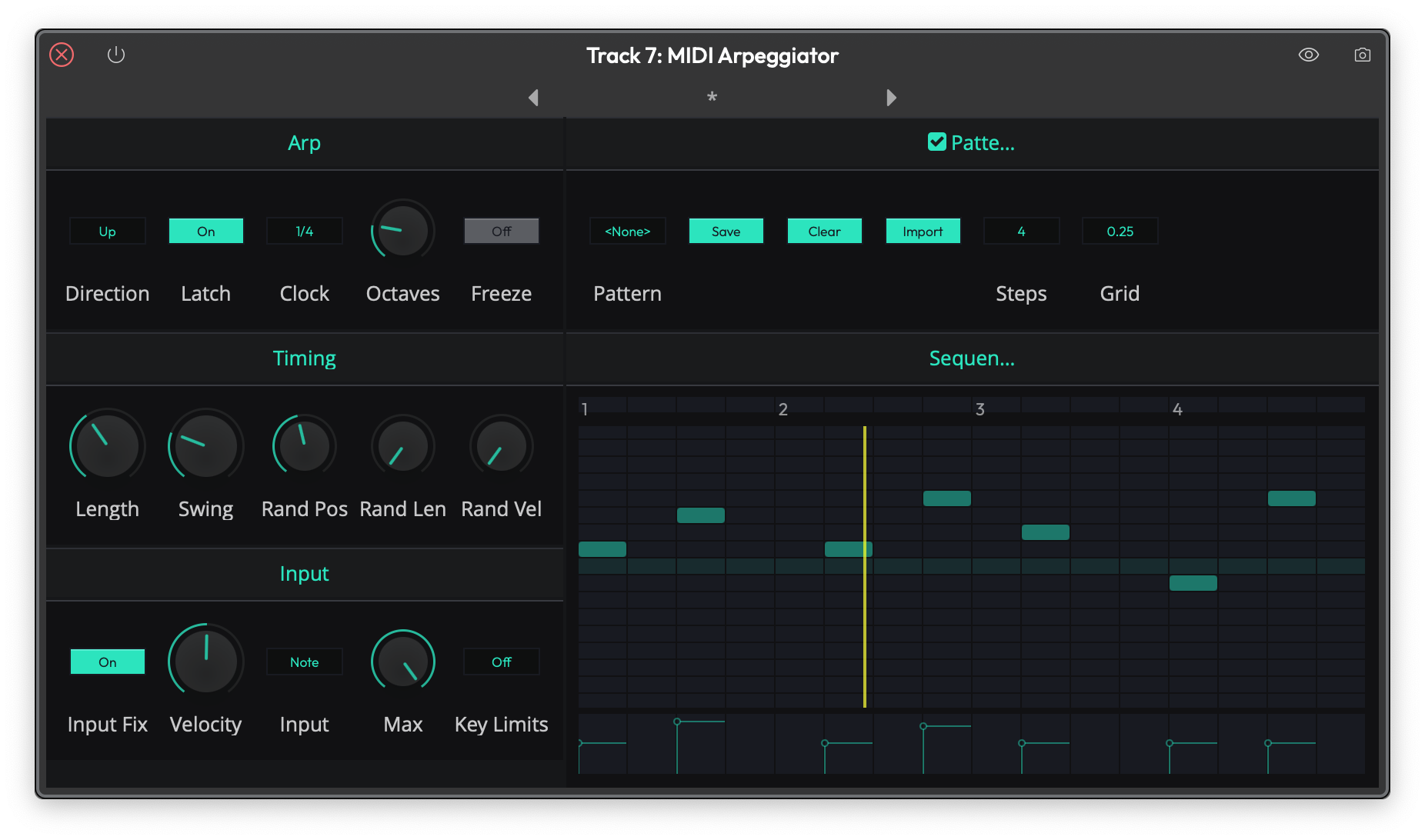
The MIDI Arpeggiator
Arp section:
- Direction — The order the held notes are played in: Up, Down, Cascade, Alt 1, Alt 2, Random, Chord 1 Octave, or Chord All Octaves. The Chord modes replay the whole chord rhythmically instead of one note at a time. (Default: Up)
- Latch — Keeps the pattern running after you release the keys. (Default: off)
- Clock — The musical rate of the pattern, from 4 Bars down to 1/64, including dotted and triplet values. (Default: 1/4)
- Octaves — Spreads the pattern over 1 to 10 octaves. (Default: 1)
- Freeze — Locks the current input chord so the pattern keeps playing it regardless of what you play next.
Timing section:
- Length — Gate length of each generated note, 25% to 400%. (Default: 100%)
- Swing — Delays alternate steps for a shuffle feel, 0% to 100%. (Default: 0%)
- Rand Pos / Rand Len / Rand Vel — Randomize each note's position, length, and velocity, 0% to 100%. (Defaults: 0%)
Input section:
- Input Fix — Forces all input notes to a fixed velocity.
- Velocity — The fixed velocity used when Input Fix is on, 0 to
- (Default: 64)
- Input — How input velocities map to the pattern: As Played, Note, or Inverse Note. (Default: Note)
- Max — The maximum number of held notes used, 1 to 16. (Default: 16)
- Key Limits — Constrains the output note range: Off, Fix, Clip, Fold Octave, or Fold Range. (Default: Off)
Pattern section:
Switch the Pattern toggle on to replace the straight cycle with a step pattern of your own. The piano-roll style editor covers ±12 semitones relative to the arpeggiated notes. Use Pattern to load a preset pattern, Save and Clear to manage your own, Import to import a pattern from a MIDI file, Steps to set the pattern length (1 to 32 steps), and Grid to set the step size (1 bar, 1/2, 1/4, 1/8, or 1/16).
MIDI Chord Companion (Pro edition)
Chord Companion is a pad-based chord launcher. You assign a chord to each of up to 64 pads (four banks, A to D, of 16), and a single trigger note then fires the whole chord — ideal for playing progressions from a pad controller or a few keys. It also includes a built-in arpeggiator, a chord repeater, and a randomize section. Chord Companion is available in Waveform Pro 11 and later, and goes on a track's plugin chain before the instrument (it can't be added to a clip).
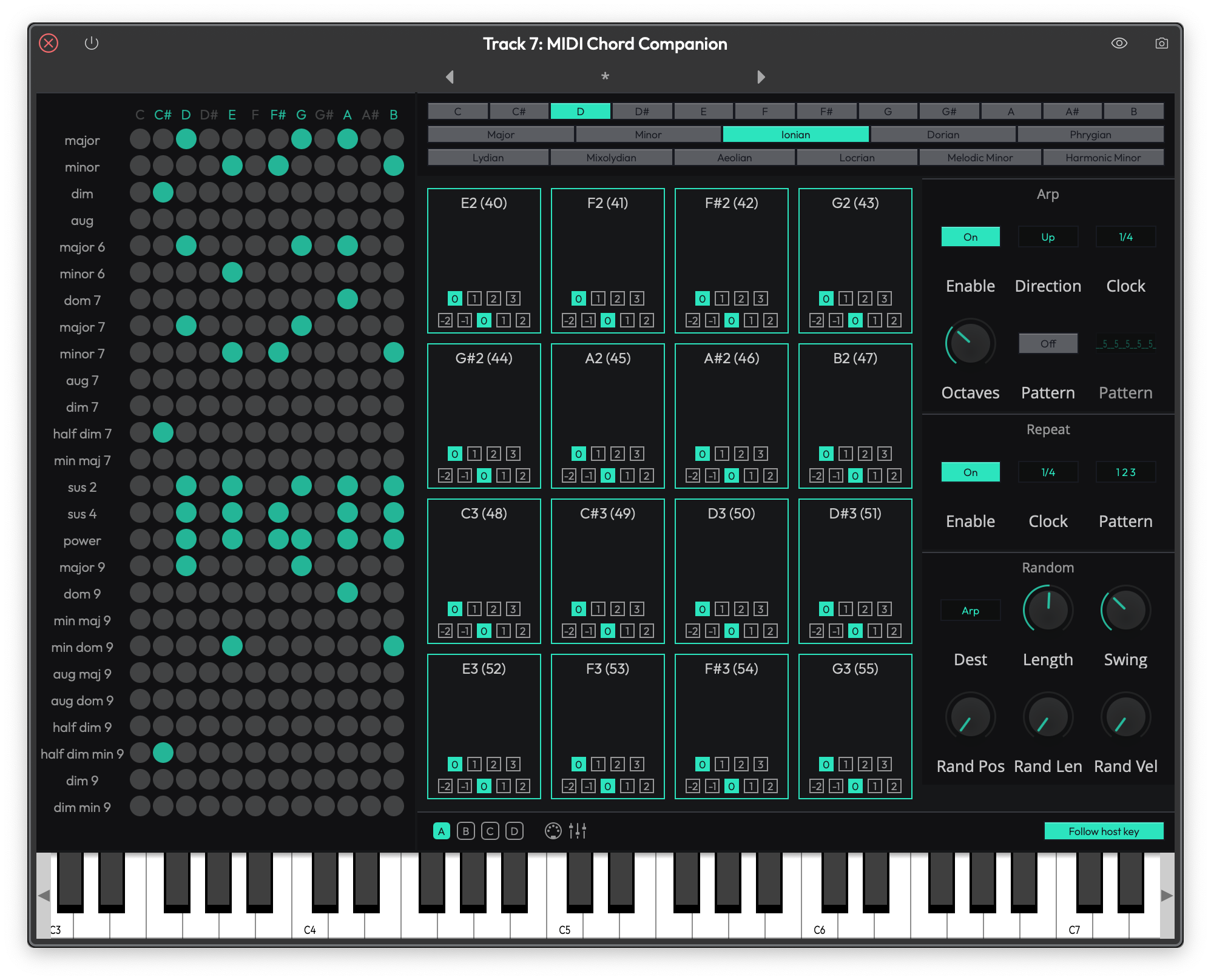
The MIDI Chord Companion
The editor is a single page with several areas: the Chord List on the left (drag chords from here onto pads), the Scale Selector (root note and scale type) and Chord Pads grid in the centre, the Arp, Repeat, and Random columns on the right, and a keyboard visualiser along the bottom showing the trigger keys and the notes being produced.
Each pad has a trigger note plus two settings of its own: Octave (-2 to +2, default 0) and Inversion (0 to 3, default 0).
The footer holds the Bank A–D selector, Learn (press keys on your controller to assign trigger notes to the pads in sequence), Presets (save and load complete pad layouts), and Follow host key — when enabled, the pads follow the edit's key signature. (Default: on)
Arp — Switch it on to arpeggiate the triggered chords. Controls match the MIDI Arpeggiator: Direction (Up, Down, Cascade, Alt 1, Alt 2, Random, Chord 1 Octave, Chord All Octaves), Clock (default 1/4), Octaves (1 to 10), plus an optional step Pattern. (Default: off)
Repeat — Switch it on to retrigger the chords rhythmically, with its own Clock and step Pattern. (Default: off)
Random — Available when the Arp or Repeat is on. Dest chooses what the timing controls affect (Both, Arp, or Repeat — default Arp), followed by Length (25% to 400%, default 100%), Swing (0% to 100%, default 0%), and Rand Pos / Rand Len / Rand Vel (0% to 100%, defaults 0%).
MIDI Chord Player
The MIDI Chord Player is a live single-note harmonizer: play one note and hear a full chord. Modifier keys let you switch chord types as you play. It is available in all editions of Waveform, and goes on a track's plugin chain before the instrument (it can't be added to a clip).
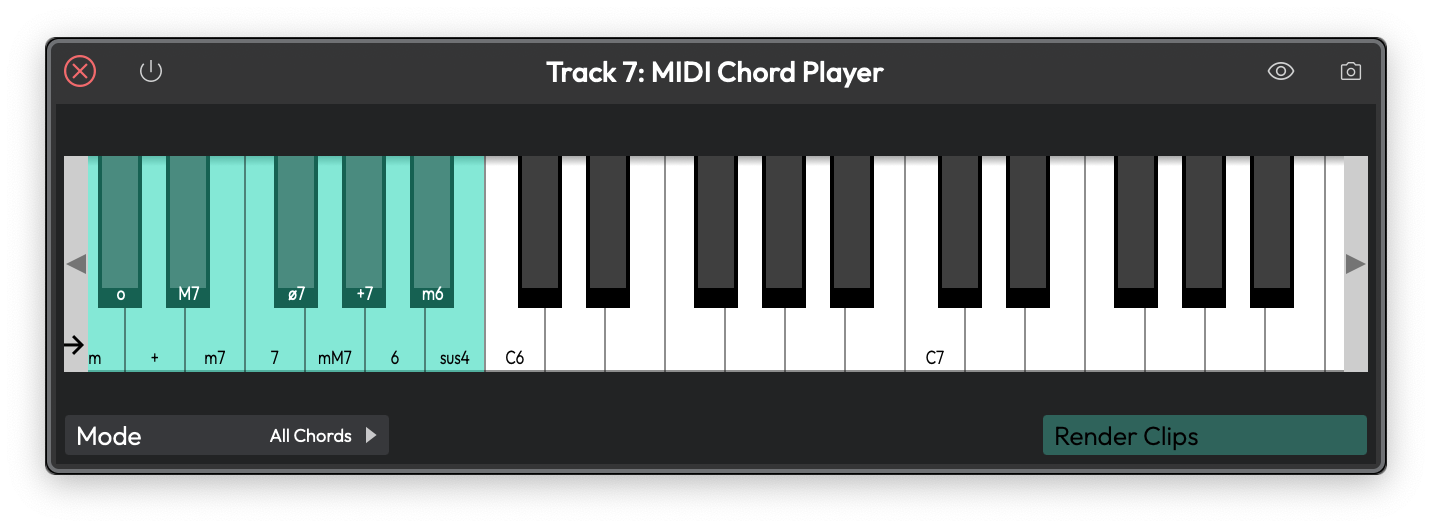
The MIDI Chord Player
Mode — Chooses the type of chords to play. (Default: All Chords)
- All Chords — Every playing key produces a major chord by default. Twelve modifier keys select other chord types: minor, diminished, augmented, major 7th, minor 7th, dominant 7th, half-diminished 7th, minor-major 7th, augmented 7th, major 6th, minor 6th, and suspended 4th.
- Chords in key only — A smart mode that follows the edit's key and only produces diatonic chords. Two modifier keys add 6th and 7th variations.
The modifier keys are shown coloured on the plugin's on-screen keyboard, starting just above the playing range. Drag the marker on the keyboard to move where the modifier keys begin. (Default: MIDI note 72)
Render Clips — Bakes the harmonized chords into the MIDI clips on the track as ordinary notes, then removes the Chord Player from the track.
MIDI Modifier (Pro edition)
MIDI modifier is a transposer for MIDI data. Use the controls to shift the pitch of MIDI notes up or down by fixed intervals.
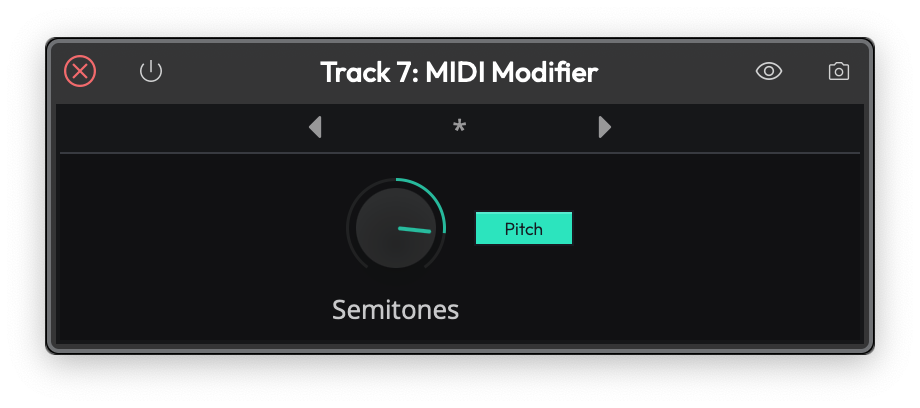
The MIDI Modifier
MIDI Note Repeater (Pro edition)
The Note Repeater fires a rhythmic pattern while notes are held — hold a chord and it retriggers in time with the edit. It shares its engine and much of its design with the MIDI Arpeggiator, but it is purely rhythmic: the held notes always play together as a chord, with no note ordering or octave spread. It is available in Waveform Pro 11 and later, and goes on a track's plugin chain before the instrument (it can't be added to a clip).
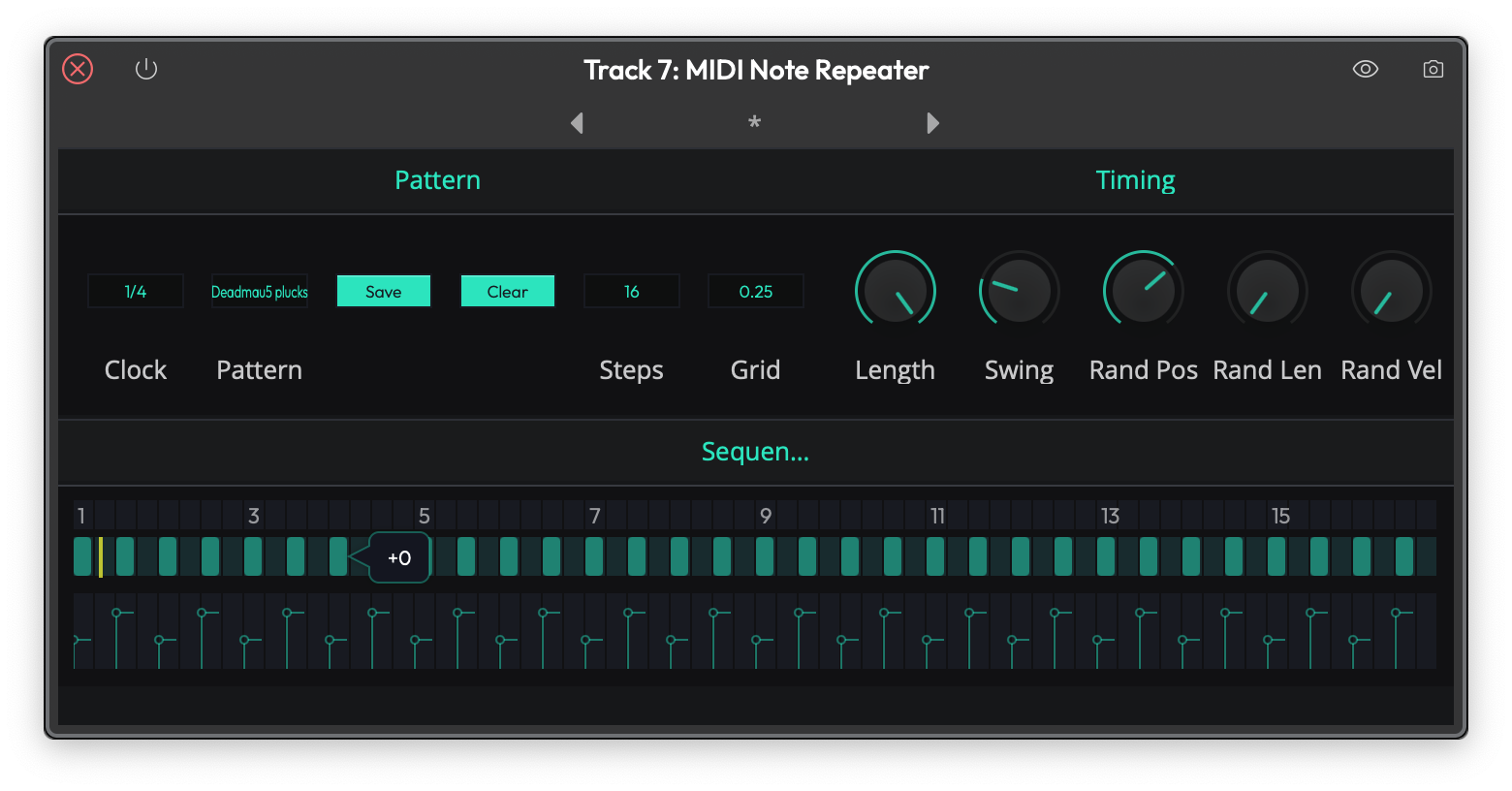
The MIDI Note Repeater
Pattern section:
- Clock — The musical rate, from 4 Bars down to 1/64, including dotted and triplet values. (Default: 1/4)
- A single-row step editor — the Sequencer grid — sets the rhythm. Click cells to draw steps on or off, and use the velocity lane beneath the grid to set how hard each step hits. Use Pattern to load a preset, Save and Clear to manage your own, Steps to set the pattern length (1 to 32 steps), and Grid to set the step size (1 bar, 1/2, 1/4, 1/8, or 1/16).
Timing section:
- Length — Gate length of each repeated note, 1% to 100%. (Note the smaller range than the Arpeggiator's 25–400%.) (Default: 100%)
- Swing — 0% to 100%. (Default: 0%)
- Rand Pos / Rand Len / Rand Vel — Randomize position, length, and velocity, 0% to 100%. (Defaults: 0%)
Waveform Utilities
MIDI Filter (Pro edition) - MIDI Filter allows notes to pass through only within the range defined. To see the range and create a zone, drag the arrows from the left and right sides of the on-screen keyboard. Use two or more of these within a Plugin rack to create zones that play different virtual instruments. For example play bass on the left side of your controller and piano on the right
MIDI Monitor - Shows the stream of MIDI data to debug your setup or better understand the output from your controller or keyboard. This plugin does not alter the data so you won't hear any effect when it is active
MIDI Patch Bay - Allows mapping from one MIDI channel to another. Any of the 16 channels can be remapped to any other channel. In addition you can selectively block channels from passing any MIDI data through the plugin.
MIDI Note Names - Lets you give any of the 128 MIDI notes a custom name, and switch individual notes on or off. It's most useful in front of a drum instrument: name note 36 Kick, note 38 Snare, and so on, and those names then appear in the piano roll so you're editing Kick and Snare instead of C1 and D1. The plugin doesn't change the audio — it only relabels the notes.
MIDI CC - Generates MIDI continuous-controller (CC) messages and lets you route them to a chosen CC number. Each value is an automatable parameter, so you can draw or record CC automation — modulation, expression, filter cutoff, and the like — and send it on to a virtual instrument or external gear downstream.
Rewire Device - Use this to use any Rewire compatible DAW as a plugin within Waveform.